Queue and other other background process on AWS Elastic Beanstalk

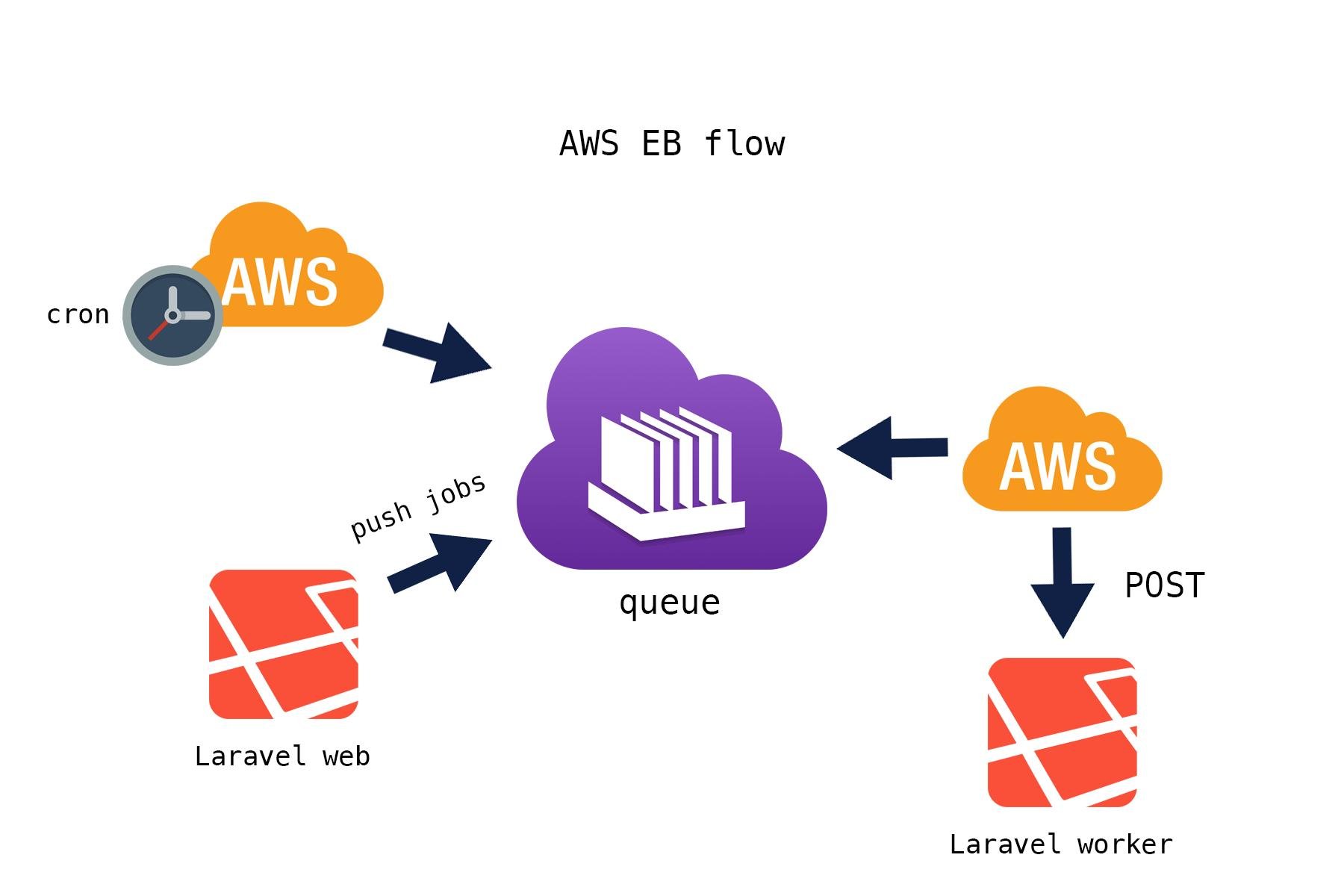
1. Background
A Laravel 10.x and above application is running in production on AWS Elastic Beanstalk (EB). The application already uses:
-
Jobs and queues
-
Database queue driver (initially)
-
Plans to add real-time features using Laravel Reverb in the future
The team faced uncertainty around:
-
How queues actually work in production on EB
-
Whether queued jobs are safe during deployments and auto-scaling
-
Whether using AWS SQS is reliable or risky
This blog clarifies the real problem, common misconceptions, and the optimal production-ready solution.
2. The Core Problem
2.1 Misconception
"If we use SQS, queued jobs will be destroyed every time we deploy or when Elastic Beanstalk scales."
This belief caused hesitation in adopting SQS and led to confusion about how queues should be run in production.
2.2 What Actually Happens on Elastic Beanstalk
Elastic Beanstalk regularly terminates and recreates EC2 instances during:
-
Application deployments
-
Auto-scaling (scale up / scale down)
-
Environment rebuilds
Because EC2 instances are ephemeral, any process running on them (queue workers, long-running commands) can be stopped at any time.
This led to the incorrect assumption that:
-
Jobs are lost
-
SQS is unsafe
3. The Real Root Cause
The real issue is not SQS.
The real issue is misunderstanding worker lifecycle vs queue durability.
Key Distinction
| Component | Nature |
|---|---|
| EC2 / EB instances | Ephemeral (can be destroyed) |
| Queue workers | Ephemeral (run on instances) |
| AWS SQS queue | Durable & persistent |
Elastic Beanstalk destroys instances, not SQS messages.
4. How AWS SQS Actually Works
SQS is a pull-based, durable queue system:
-
Worker pulls a message from SQS
-
Message becomes invisible (visibility timeout)
-
Worker processes the job
-
On success → message is deleted
-
If worker crashes or instance is terminated → message becomes visible again
This means:
-
Deployments are safe
-
Scaling is safe
-
Instance termination does NOT destroy jobs
5. The Optimal Architecture (Production-Grade)
5.1 Recommended Setup on Elastic Beanstalk
Use two separate Elastic Beanstalk environments:
1. Web Environment
-
Handles HTTP requests
-
Runs Nginx + PHP-FPM
-
Dispatches jobs to the queue
-
Does NOT process jobs
2. Worker Environment
-
Consumes messages from SQS
-
Runs
php artisan queue:work -
Can scale independently
Logical Flow
Browser
  ↓
EB Web Environment
  ↓ dispatch()
AWS SQS (durable)
  ↓ pull
EB Worker Environment
This is the AWS-recommended and industry-standard approach.
6. Correct Laravel + SQS Configuration
6.1 Environment Configuration
QUEUE_CONNECTION=sqs

AWS_DEFAULT_REGION=ap-south-1
AWS_ACCESS_KEY_ID=****
AWS_SECRET_ACCESS_KEY=****

SQS_QUEUE=laravel-production
SQS_PREFIX=https://sqs.ap-south-1.amazonaws.com/123456789012
6.2 Worker Command (Critical)
php artisan queue:work sqs --sleep=3 --tries=3 --timeout=120
This ensures:
-
Safe retries
-
Graceful handling during instance termination
-
No silent job loss
7. Visibility Timeout Rule (Most Important Detail)
Golden Rule
SQS Visibility Timeout > Job Execution Time
Example
If a job may take up to 90 seconds:
-
Laravel job timeout:
120s -
SQS visibility timeout:
150–180s
Failing to do this may cause duplicate job execution, not job loss.
8. What Happens During Deployments & Scaling
Deployment Scenario
-
EB terminates old instances
-
Worker stops mid-job
-
Message becomes visible again in SQS
-
New worker processes it
Result: No job loss
Auto-Scaling Scenario
-
Worker instance is removed
-
Messages remain in SQS
-
Other workers continue processing
Result: No job loss
9. When Jobs Are Actually Lost
Jobs are lost only if:
-
Messages are manually deleted
-
Visibility timeout is misconfigured
-
Jobs delete messages before completion
-
No retry / failed job handling exists
These are configuration issues, not SQS limitations.
10. Why Database Queues Are NOT Optimal on EB
| Queue Type | Suitability on EB |
|---|---|
| Database | ❌ Poor (instance-bound) |
| Redis | ⚠️ Operational overhead |
| SQS | ✅ Best choice |
Elastic Beanstalk is designed to work seamlessly with SQS + Worker Environments.
11. Preparing for Laravel Reverb (Future)
This architecture is future-proof:
-
Jobs → handled by SQS workers
-
Web requests → remain stateless
-
Reverb → can run as a separate service
No queue redesign is required later.
12. Final Conclusion
-
Elastic Beanstalk instances are ephemeral by design
-
AWS SQS is durable and safe
-
Jobs are NOT destroyed during deployments or scaling
-
The correct solution is SQS + EB Worker Environment
This setup is production-tested, scalable, and aligns with AWS best practices.
Bibek Shrestha
I’m Bibek, full-stack developer skilled in Laravel, Vue/Nuxt, Livewire, Tailwind, and Odoo. Experienced in ERP, real-time apps, multi-tenant systems, and scalable web solutions. I’m particularly interested in clean architectures, performance optimization, and modern tooling like Livewire, Volt, and Tailwind. I see myself not just as a builder, but as someone who creates systems that teams and users can truly rely on.